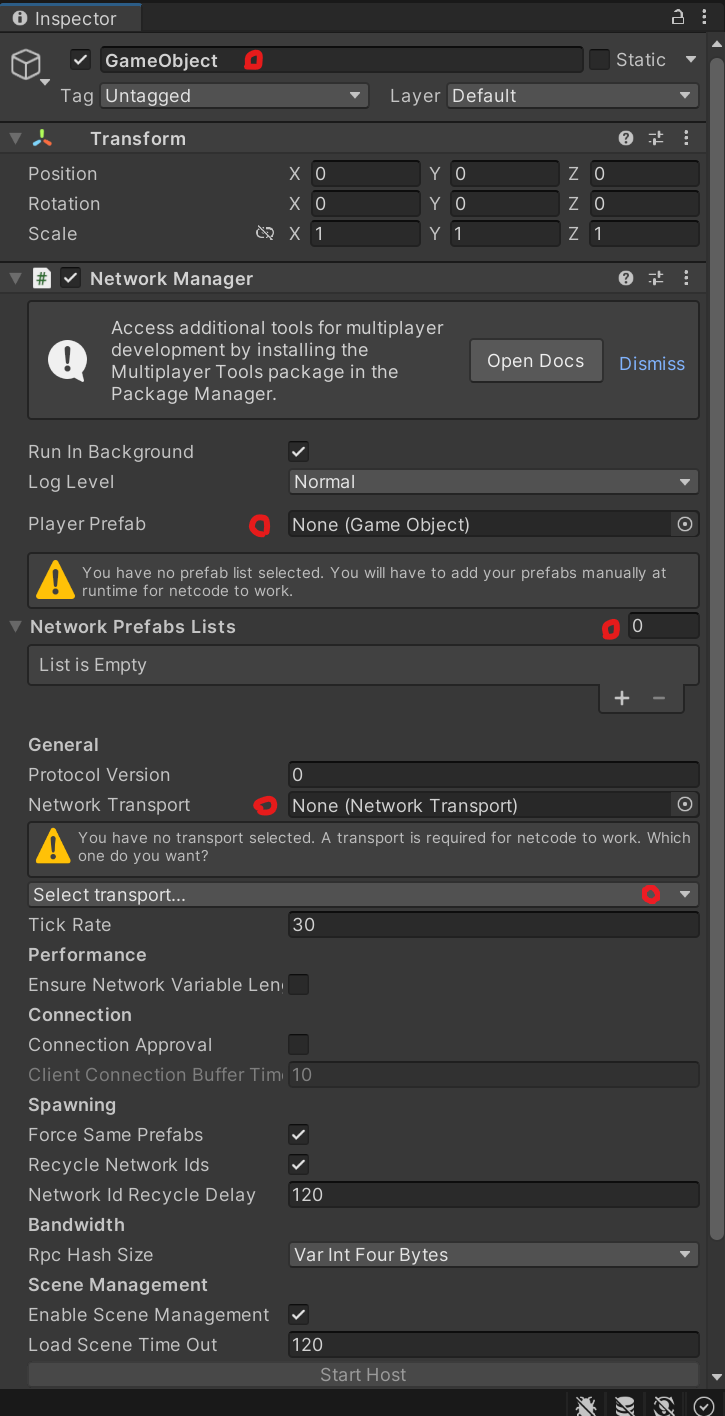
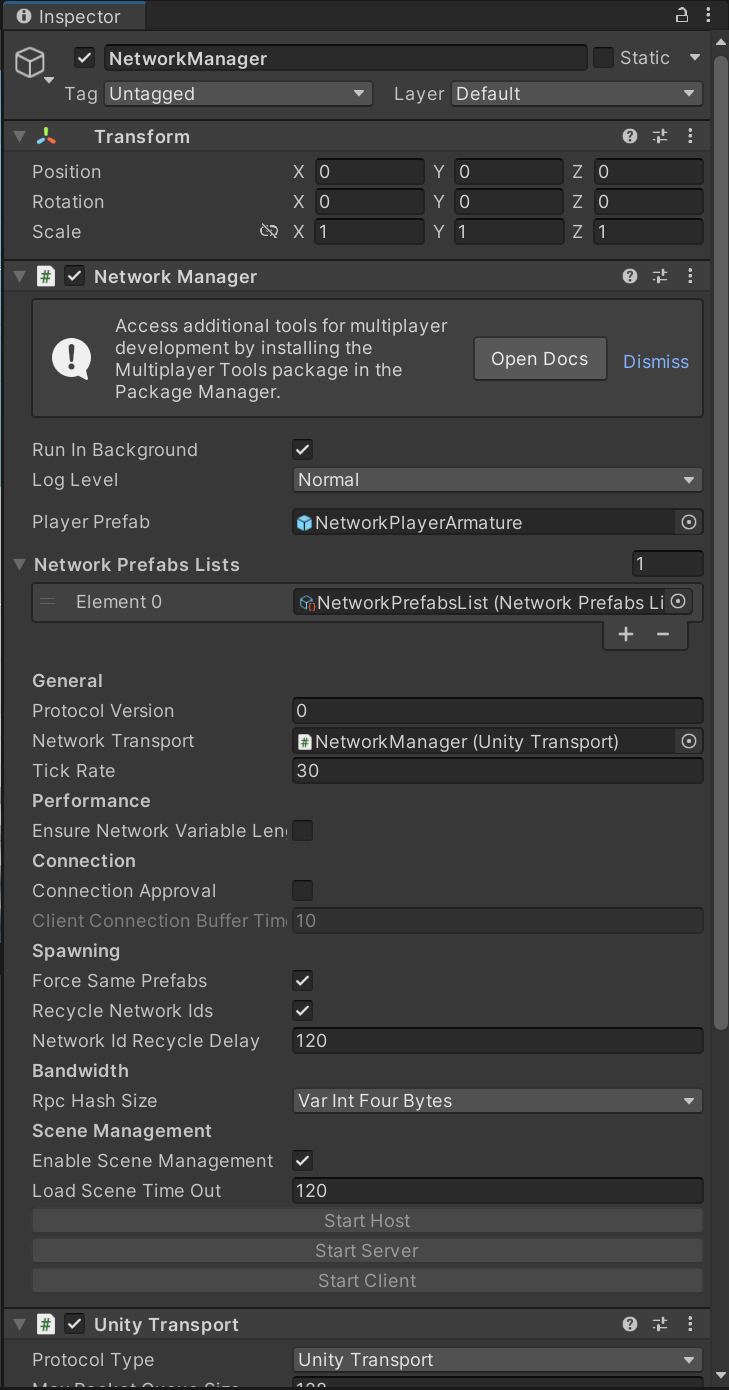
using System.Collections;
using System.Collections.Generic;
using Unity.Netcode.Components;
using UnityEngine;

public class ClientNetworkTransform : NetworkTransform
{
    protected override bool OnIsServerAuthoritative()
    {
        return false;
    }

}
ClientNetworkAnimator.cs
using System.Collections;
using System.Collections.Generic;
using Unity.Netcode.Components;
using UnityEngine;

public class ClientNetworkAnimator : NetworkAnimator
{
    protected override bool OnIsServerAuthoritative()
    {
        return false;
    }
}
using Cinemachine;
using UnityEngine;
using Unity.Netcode;

#if ENABLE_INPUT_SYSTEM
using UnityEngine.InputSystem;
#endif

/* Note: animations are called via the controller for both the character and capsule using animator null checks
 */

namespace StarterAssets
{
    [RequireComponent(typeof(CharacterController))]
#if ENABLE_INPUT_SYSTEM
    [RequireComponent(typeof(PlayerInput))]
#endif
    public class ThirdPersonController : NetworkBehaviour
    {
        [Header("Player")]
        [Tooltip("Move speed of the character in m/s")]
        public float MoveSpeed = 2.0f;

        [Tooltip("Sprint speed of the character in m/s")]
        public float SprintSpeed = 5.335f;

        [Tooltip("How fast the character turns to face movement direction")]
        [Range(0.0f, 0.3f)]
        public float RotationSmoothTime = 0.12f;

        [Tooltip("Acceleration and deceleration")]
        public float SpeedChangeRate = 10.0f;

        public AudioClip LandingAudioClip;
        public AudioClip[] FootstepAudioClips;
        [Range(0, 1)] public float FootstepAudioVolume = 0.5f;

        [Space(10)]
        [Tooltip("The height the player can jump")]
        public float JumpHeight = 1.2f;

        [Tooltip("The character uses its own gravity value. The engine default is -9.81f")]
        public float Gravity = -15.0f;

        [Space(10)]
        [Tooltip("Time required to pass before being able to jump again. Set to 0f to instantly jump again")]
        public float JumpTimeout = 0.50f;

        [Tooltip("Time required to pass before entering the fall state. Useful for walking down stairs")]
        public float FallTimeout = 0.15f;

        [Header("Player Grounded")]
        [Tooltip("If the character is grounded or not. Not part of the CharacterController built in grounded check")]
        public bool Grounded = true;

        [Tooltip("Useful for rough ground")]
        public float GroundedOffset = -0.14f;

        [Tooltip("The radius of the grounded check. Should match the radius of the CharacterController")]
        public float GroundedRadius = 0.28f;

        [Tooltip("What layers the character uses as ground")]
        public LayerMask GroundLayers;

        [Header("Cinemachine")]
        [Tooltip("The follow target set in the Cinemachine Virtual Camera that the camera will follow")]
        public GameObject CinemachineCameraTarget;

        [Tooltip("How far in degrees can you move the camera up")]
        public float TopClamp = 70.0f;

        [Tooltip("How far in degrees can you move the camera down")]
        public float BottomClamp = -30.0f;

        [Tooltip("Additional degress to override the camera. Useful for fine tuning camera position when locked")]
        public float CameraAngleOverride = 0.0f;

        [Tooltip("For locking the camera position on all axis")]
        public bool LockCameraPosition = false;

        // cinemachine
        private float _cinemachineTargetYaw;
        private float _cinemachineTargetPitch;

        // player
        private float _speed;
        private float _animationBlend;
        private float _targetRotation = 0.0f;
        private float _rotationVelocity;
        private float _verticalVelocity;
        private float _terminalVelocity = 53.0f;

        // timeout deltatime
        private float _jumpTimeoutDelta;
        private float _fallTimeoutDelta;

        // animation IDs
        private int _animIDSpeed;
        private int _animIDGrounded;
        private int _animIDJump;
        private int _animIDFreeFall;
        private int _animIDMotionSpeed;

#if ENABLE_INPUT_SYSTEM
        private PlayerInput _playerInput;
#endif
        private Animator _animator;
        private CharacterController _controller;
        private StarterAssetsInputs _input;
        private GameObject _mainCamera;
        private GameObject _PlayerCameraRoot;
        private CinemachineVirtualCamera _CinemachineVirtualCamera;

        private const float _threshold = 0.01f;

        private bool _hasAnimator;

        private bool IsCurrentDeviceMouse
        {
            get
            {
#if ENABLE_INPUT_SYSTEM
                return _playerInput.currentControlScheme == "KeyboardMouse";
#else
				return false;
#endif
            }
        }


        private void Awake()
        {
            // get a reference to our main camera
            if (_mainCamera == null)
            {
                _mainCamera = GameObject.FindGameObjectWithTag("MainCamera");
            }
            if(_CinemachineVirtualCamera == null)
            {
                _CinemachineVirtualCamera = FindObjectOfType();
            }
        }

        private void Start()
        {
            _cinemachineTargetYaw = CinemachineCameraTarget.transform.rotation.eulerAngles.y;

            _hasAnimator = TryGetComponent(out _animator);
            _controller = GetComponent();
            _input = GetComponent();

//#if ENABLE_INPUT_SYSTEM
//            _playerInput = GetComponent();
//#else
//			Debug.LogError( "Starter Assets package is missing dependencies. Please use Tools/Starter Assets/Reinstall Dependencies to fix it");
//#endif

            AssignAnimationIDs();

            // reset our timeouts on start
            _jumpTimeoutDelta = JumpTimeout;
            _fallTimeoutDelta = FallTimeout;
        }

        public override void OnNetworkSpawn()
        {
            base.OnNetworkSpawn();

            if(IsClient && IsOwner)
            {
                _playerInput = GetComponent();
                _playerInput.enabled = true;
                _PlayerCameraRoot = transform.Find("PlayerCameraRoot").gameObject;
                _CinemachineVirtualCamera.Follow = _PlayerCameraRoot.transform;
            }

        }


        private void Update()
        {
            if (IsOwner)
            {
                _hasAnimator = TryGetComponent(out _animator);

                JumpAndGravity();
                GroundedCheck();
                Move();
            }
        }

        private void LateUpdate()
        {
            CameraRotation();
        }

        private void AssignAnimationIDs()
        {
            _animIDSpeed = Animator.StringToHash("Speed");
            _animIDGrounded = Animator.StringToHash("Grounded");
            _animIDJump = Animator.StringToHash("Jump");
            _animIDFreeFall = Animator.StringToHash("FreeFall");
            _animIDMotionSpeed = Animator.StringToHash("MotionSpeed");
        }

        private void GroundedCheck()
        {
            // set sphere position, with offset
            Vector3 spherePosition = new Vector3(transform.position.x, transform.position.y - GroundedOffset,
                transform.position.z);
            Grounded = Physics.CheckSphere(spherePosition, GroundedRadius, GroundLayers,
                QueryTriggerInteraction.Ignore);

            // update animator if using character
            if (_hasAnimator)
            {
                _animator.SetBool(_animIDGrounded, Grounded);
            }
        }

        private void CameraRotation()
        {
            // if there is an input and camera position is not fixed
            if (_input.look.sqrMagnitude >= _threshold && !LockCameraPosition)
            {
                //Don't multiply mouse input by Time.deltaTime;
                float deltaTimeMultiplier = IsCurrentDeviceMouse ? 1.0f : Time.deltaTime;

                _cinemachineTargetYaw += _input.look.x * deltaTimeMultiplier;
                _cinemachineTargetPitch += _input.look.y * deltaTimeMultiplier;
            }

            // clamp our rotations so our values are limited 360 degrees
            _cinemachineTargetYaw = ClampAngle(_cinemachineTargetYaw, float.MinValue, float.MaxValue);
            _cinemachineTargetPitch = ClampAngle(_cinemachineTargetPitch, BottomClamp, TopClamp);

            // Cinemachine will follow this target
            CinemachineCameraTarget.transform.rotation = Quaternion.Euler(_cinemachineTargetPitch + CameraAngleOverride,
                _cinemachineTargetYaw, 0.0f);
        }

        private void Move()
        {
            // set target speed based on move speed, sprint speed and if sprint is pressed
            float targetSpeed = _input.sprint ? SprintSpeed : MoveSpeed;

            // a simplistic acceleration and deceleration designed to be easy to remove, replace, or iterate upon

            // note: Vector2's == operator uses approximation so is not floating point error prone, and is cheaper than magnitude
            // if there is no input, set the target speed to 0
            if (_input.move == Vector2.zero) targetSpeed = 0.0f;

            // a reference to the players current horizontal velocity
            float currentHorizontalSpeed = new Vector3(_controller.velocity.x, 0.0f, _controller.velocity.z).magnitude;

            float speedOffset = 0.1f;
            float inputMagnitude = _input.analogMovement ? _input.move.magnitude : 1f;

            // accelerate or decelerate to target speed
            if (currentHorizontalSpeed < targetSpeed - speedOffset ||
                currentHorizontalSpeed > targetSpeed + speedOffset)
            {
                // creates curved result rather than a linear one giving a more organic speed change
                // note T in Lerp is clamped, so we don't need to clamp our speed
                _speed = Mathf.Lerp(currentHorizontalSpeed, targetSpeed * inputMagnitude,
                    Time.deltaTime * SpeedChangeRate);

                // round speed to 3 decimal places
                _speed = Mathf.Round(_speed * 1000f) / 1000f;
            }
            else
            {
                _speed = targetSpeed;
            }

            _animationBlend = Mathf.Lerp(_animationBlend, targetSpeed, Time.deltaTime * SpeedChangeRate);
            if (_animationBlend < 0.01f) _animationBlend = 0f;

            // normalise input direction
            Vector3 inputDirection = new Vector3(_input.move.x, 0.0f, _input.move.y).normalized;

            // note: Vector2's != operator uses approximation so is not floating point error prone, and is cheaper than magnitude
            // if there is a move input rotate player when the player is moving
            if (_input.move != Vector2.zero)
            {
                _targetRotation = Mathf.Atan2(inputDirection.x, inputDirection.z) * Mathf.Rad2Deg +
                                  _mainCamera.transform.eulerAngles.y;
                float rotation = Mathf.SmoothDampAngle(transform.eulerAngles.y, _targetRotation, ref _rotationVelocity,
                    RotationSmoothTime);

                // rotate to face input direction relative to camera position
                transform.rotation = Quaternion.Euler(0.0f, rotation, 0.0f);
            }


            Vector3 targetDirection = Quaternion.Euler(0.0f, _targetRotation, 0.0f) * Vector3.forward;

            // move the player
            _controller.Move(targetDirection.normalized * (_speed * Time.deltaTime) +
                             new Vector3(0.0f, _verticalVelocity, 0.0f) * Time.deltaTime);

            // update animator if using character
            if (_hasAnimator)
            {
                _animator.SetFloat(_animIDSpeed, _animationBlend);
                _animator.SetFloat(_animIDMotionSpeed, inputMagnitude);
            }
        }

        private void JumpAndGravity()
        {
            if (Grounded)
            {
                // reset the fall timeout timer
                _fallTimeoutDelta = FallTimeout;

                // update animator if using character
                if (_hasAnimator)
                {
                    _animator.SetBool(_animIDJump, false);
                    _animator.SetBool(_animIDFreeFall, false);
                }

                // stop our velocity dropping infinitely when grounded
                if (_verticalVelocity < 0.0f)
                {
                    _verticalVelocity = -2f;
                }

                // Jump
                if (_input.jump && _jumpTimeoutDelta <= 0.0f)
                {
                    // the square root of H * -2 * G = how much velocity needed to reach desired height
                    _verticalVelocity = Mathf.Sqrt(JumpHeight * -2f * Gravity);

                    // update animator if using character
                    if (_hasAnimator)
                    {
                        _animator.SetBool(_animIDJump, true);
                    }
                }

                // jump timeout
                if (_jumpTimeoutDelta >= 0.0f)
                {
                    _jumpTimeoutDelta -= Time.deltaTime;
                }
            }
            else
            {
                // reset the jump timeout timer
                _jumpTimeoutDelta = JumpTimeout;

                // fall timeout
                if (_fallTimeoutDelta >= 0.0f)
                {
                    _fallTimeoutDelta -= Time.deltaTime;
                }
                else
                {
                    // update animator if using character
                    if (_hasAnimator)
                    {
                        _animator.SetBool(_animIDFreeFall, true);
                    }
                }

                // if we are not grounded, do not jump
                _input.jump = false;
            }

            // apply gravity over time if under terminal (multiply by delta time twice to linearly speed up over time)
            if (_verticalVelocity < _terminalVelocity)
            {
                _verticalVelocity += Gravity * Time.deltaTime;
            }
        }

        private static float ClampAngle(float lfAngle, float lfMin, float lfMax)
        {
            if (lfAngle < -360f) lfAngle += 360f;
            if (lfAngle > 360f) lfAngle -= 360f;
            return Mathf.Clamp(lfAngle, lfMin, lfMax);
        }

        private void OnDrawGizmosSelected()
        {
            Color transparentGreen = new Color(0.0f, 1.0f, 0.0f, 0.35f);
            Color transparentRed = new Color(1.0f, 0.0f, 0.0f, 0.35f);

            if (Grounded) Gizmos.color = transparentGreen;
            else Gizmos.color = transparentRed;

            // when selected, draw a gizmo in the position of, and matching radius of, the grounded collider
            Gizmos.DrawSphere(
                new Vector3(transform.position.x, transform.position.y - GroundedOffset, transform.position.z),
                GroundedRadius);
        }

        private void OnFootstep(AnimationEvent animationEvent)
        {
            if (animationEvent.animatorClipInfo.weight > 0.5f)
            {
                if (FootstepAudioClips.Length > 0)
                {
                    var index = Random.Range(0, FootstepAudioClips.Length);
                    AudioSource.PlayClipAtPoint(FootstepAudioClips[index], transform.TransformPoint(_controller.center), FootstepAudioVolume);
                }
            }
        }

        private void OnLand(AnimationEvent animationEvent)
        {
            if (animationEvent.animatorClipInfo.weight > 0.5f)
            {
                AudioSource.PlayClipAtPoint(LandingAudioClip, transform.TransformPoint(_controller.center), FootstepAudioVolume);
            }
        }
    }
}
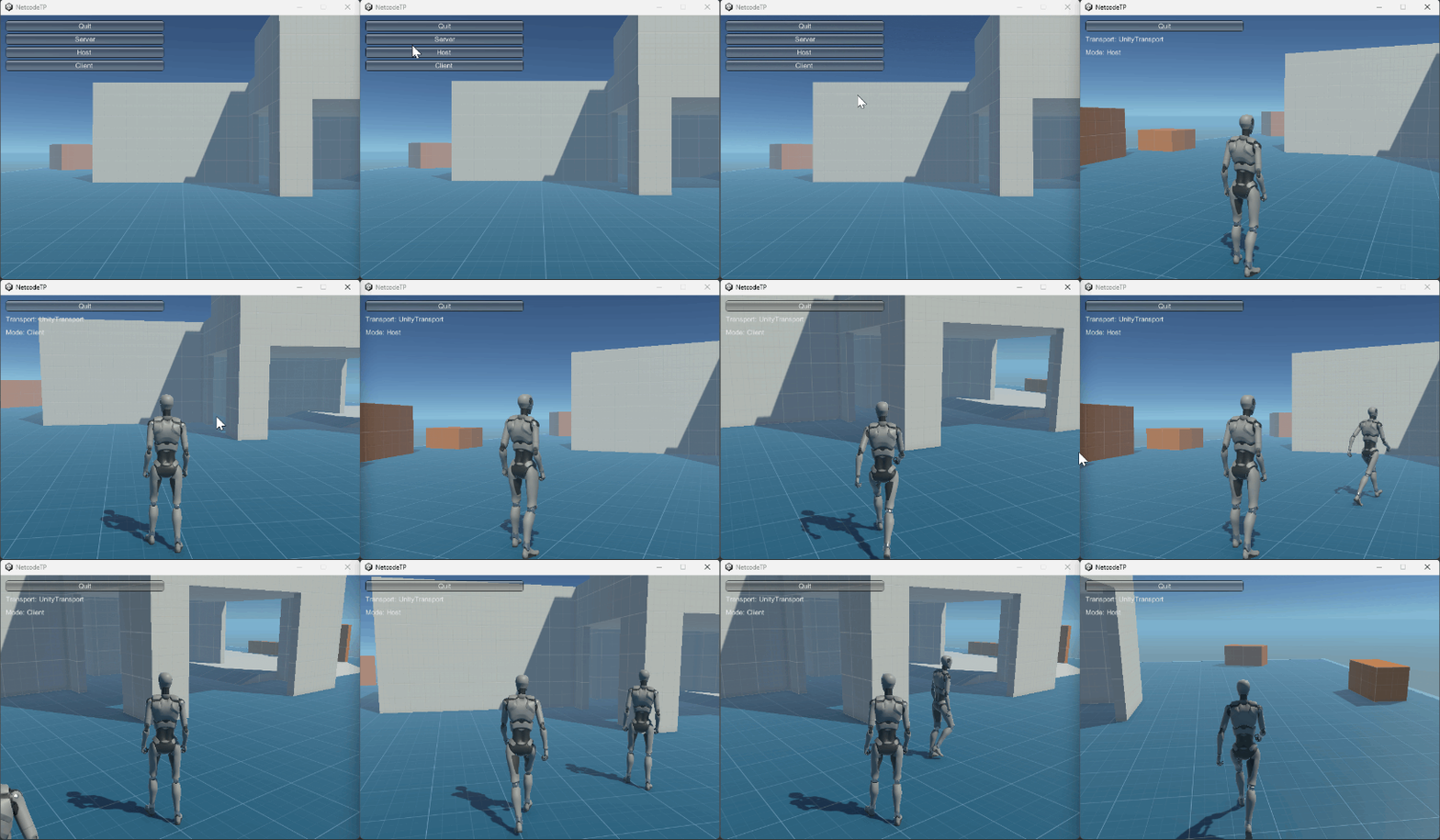
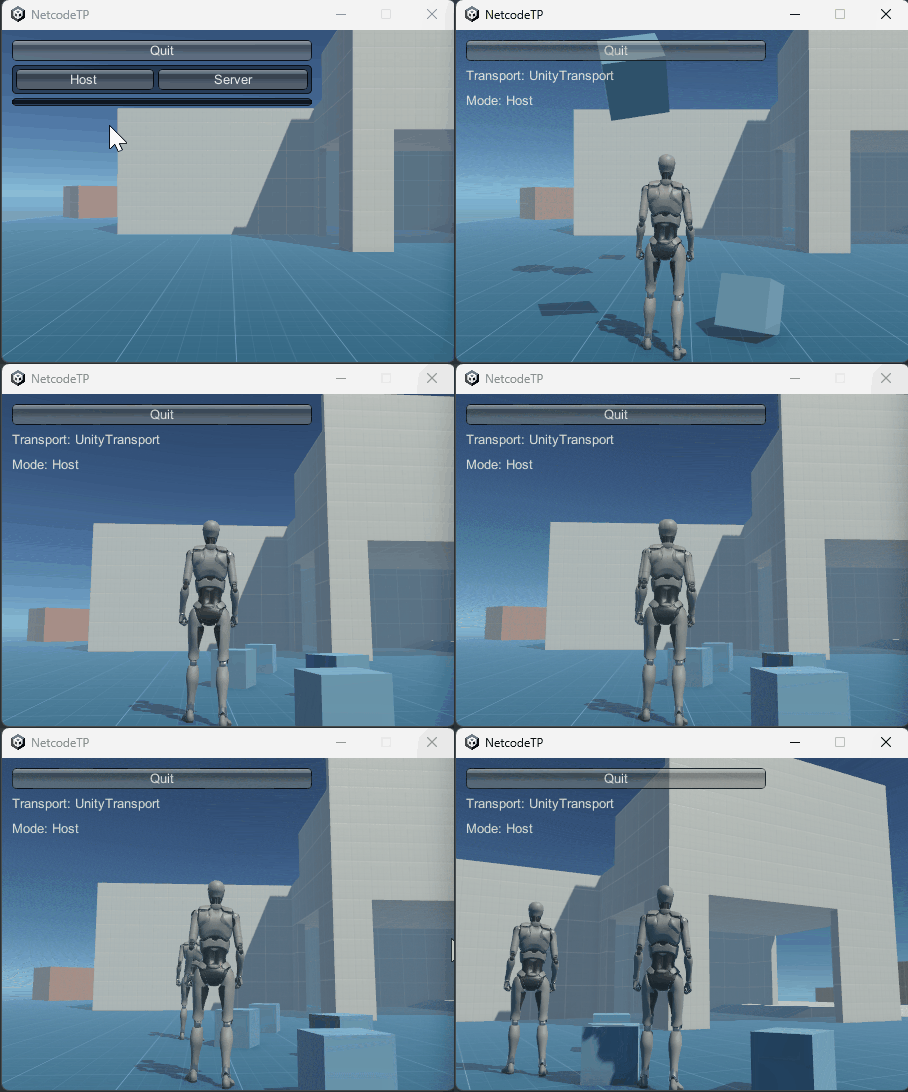
ビルドして実行
BuildSettingsで、スクリーンサイズをWindowed 800x600に変更し、
Buildシーンに編集シーンを追加しBuild and Runを実行。
まとめ Multi Player動作の完成
Unity Starter Asset Third Personを、Netcodeを使用してマルチプレーヤーに変更できた。